网站分析报告
[摘要]:在信息高速发展的今天,信息管理已经成了一个公司管理的重要问题。因此,有一套很好的信息管理模式,有一个综合信息网站就显的很重要了。本文全面的分析了一个综合信息网站的结构、功能、用途以及对公司产生的重要影响,对网站的建设、维护和推广具有很好的指导作用。
[关键词]:ASP,信息查询,记录插入,记录更新,记录删除,密码登陆,网站结构
一、系统概述
本网站是一个综合信息网站,主要是为企事业单位设计的,其功能主要体现在信息管理上面。大中小型企业可以利用本网站进行企业内部人事管理、产品销售管理、产品生产管理、网上电子商务、对自己企业进行网上宣传、进行网上交流等。其客户主要通过上网了解本公司的业务及产品情况,了解公司的人事状况,商业动态等。
对于一个企事业单位而言,它要进行各种综合业务,要及时了解企业内部的情况,要及时向外界公布信息,进行人事管理、进行产品销售、利润预算、与外界联系,因此,拥有一个综合信息网站是非常必要的。用综合信息网站来对企业进行管理,进行电子商务是很必要的,有利于公司的发展,有利于提高公司的效益,有利于提高市场竞争力,有利于树立公司品牌形象,有利于扩大公司的影响力。因此,本网站是可行的,建立本网站是必要的。
作为一个综合信息网站,本网站是可行的,虽然有些功能现在还不够完善,但就目前而言还是有很大的利用价值,以后我们还将把本网站做得更精,更完善。
二、系统需求分析
本网站作为一个综合信息网站,它必须具有公司所有的信息查询、所有内部信息的管理、及时向外部公布最新信息、接收外界的反馈信息等功能。具体体现在综合信息查询、公司简介、公司业务介绍、公司产品介绍、公司成就介绍、公司人事动态介绍、行业其他企业动态等。
本网站做为一个综合信息网站,他必须包括本公司的所有信息,列如包括人事信息、产品信息、销售信息、资产信息、市场动态信息、顾客对本产品评价等,由于现在本网站还没有完善,所以有许多方面的功能还不能实现。
1. 综合信息方面:包括人事综合信息、产品综合信息、销售综合信息、财务综合信息等。它们主要体现在机密信息的管理、一般信息的管理、信息的获取、信息的保密、信息查询、修改记录、插入记录、删除记录等。
2. 公司介绍方面:包括公司简介、公司理念、公司产品、公司成就等。主要用来对公司的介绍,树立公司品牌形象,让更多的人了解本公司,让更多的人对本公司感兴趣,由此来吸引更多的顾客。
与外界联系方面:包括顾客留言、站长公告、售后服务、行业动态、最新消息等。这部分主要是直接与顾客交流,及时了解顾客对本公司产品的看法,及时了解顾客的需求,及时向外界更新信息,让顾客了更好的了解本公司。使他们对公司的产品买的放心,用的开心。让他们感到时时我们公司在关注他们,这样有利于树立本公司的品牌形象,同时也有助于本公司产品质量的提高。
3. 娱乐方面:主要包括flash欣赏。主要是让他们感觉本网站不枯燥无味,让他们在网站上停留的时间更长,更多的了解公司。
三、 系统功能分析与设计
网站功能主要体现在数据库上面,其主要包括这几部分:
1. 综合信息部分
(1).人事综合信息
这是本网站的一个很重要的部分,他可以进行对本公司进行人事管理,及时的对表里面的信息进行更新。
a. 查询记录
这是在客户端浏览器上可以看到的网页,客户通过该页面来了解本公司的信息,因此,该页面的好坏直接关系到点击率。所以在该页面是要做的好看一点,看上去舒服一点,要从视觉上去吸引浏览者。显示记录分为整体显示部分和详细页显示部分。整体显示主要是对上哟的数据进行整体的显示,让浏览者一看就知道有一些什么信息。详细记录则是对某条记录的一个详细的说明,通过他可以对那条记录所有信息的了解。
b. 插入记录
当有新的员工加入公司时,就相应的把员工的综合信息加入表中,以后在了解某个员工的综合信息时,就有了相应的记录,从而不会使得员工信息为空。这有利于公司的人事管理,特别是大型的公司,没有这些是不行的。
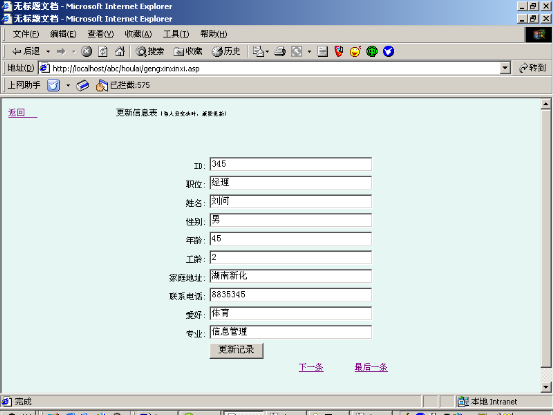
c. 更新记录
当有某些员工的家庭地址,年龄,工龄,等信息改变时,他在表里面的信息就需要改变,
因此就需要及时的改变在表里面的记录信息,这就有利于公司信息的完整性和正确性,不会使得公司信息过时。
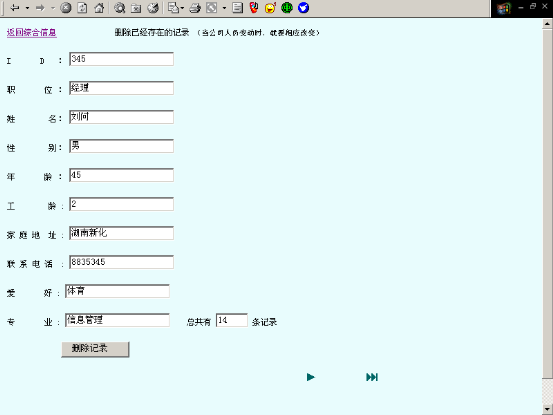
d. 删除记录
当某个员工下岗或退休时,他就不再是公司的员工,因此,他的信息也就应该删除。但是,不是一离开就删除他的信息,而是在他离开公司 5 年后才删除,这样既保证了信息的完整性,又保证了信息的动态性。
说明:插入记录,更新记录,删除记录等都是网站管理员所进行的操作,网站管理员必须登陆后才有权限对此操作。因此对网页视觉美观没有太大的要求,主要是要求很高网络安全要求。
(2). 产品综合信息
这是本网站的一个很重要的部分,他可以进行对本公司进行产品管理,及时的对表里面的信息进行更新。
a. 查询记录
这是在客户端浏览器上可以看到的网页,客户通过该页面来了解本公司的信息,因此,该页面的好坏直接关系到点击率。所以在该页面是要做的好看一点,看上去舒服一点,要从视觉上去吸引浏览者。显示记录分为整体显示部分和详细页显示部分。整体显示主要是对上哟的数据进行整体的显示,让浏览者一看就知道有一些什么信息。详细记录则是对某条记录的一个详细的说明,通过他可以对那条记录所有信息的了解。
b. 插入记录
当有新的产品加入公司时,就相应的把产品的综合信息加入表中,以后在了解某个产品的综合信息时,就有了相应的记录,从而不会使得产品信息为空。这有利于公司的生产管理,特别是大型的公司,没有这些是不行的。
c. 更新记录
当有某些产品的信息改变时,他在表里面的信息就需要改变,因此就需要及时的改变在表里面的记录信息,这就有利于公司信息的完整性和正确性,不会使得公司信息过时。
d. 删除记录
当某产品不再生产时,他的信息也就应该删除。但是,不是一停产就删除他的信息,而是在他离开公司 半年后才删除,这样既保证了信息的完整性,又保证了信息的动态性。
说明:插入记录,更新记录,删除记录等都是网站管理员所进行的操作,网站管理员必须登陆后才有权限对此操作。因此对网页视觉美观没有太大的要求,主要是要求很高网络安全要求。
四、系统数据库设计
由于是一个综合信息网站,涉及到许多数据查询,数据更新,数据删除,数据插入等方面,所以在设计网站时,因该考虑数据库设计等方面。
本网站设计了三个数据库,即综合信息数据库、密码管理数据库、留言版数据库。包括人事综合信息表,产品综合信息表,密码登陆表,客户留言表,站长回复留言表等这几个表,现在把他们的字段及构成如下:
1. 综合信息数据库:
(1). 人事综合信息表:
字段名称 | 数据类型 |
id | 数字 |
姓名 | 文本 |
性别 | 文本 |
年龄 | 数字 |
工龄 | 数字 |
职位 | 文本 |
联系电话 | 数字 |
家庭地址 | 文本 |
专业 | 文本 |
(2). 产品综合信息表:
字段名称 | 数据类型 |
产品id | 自动排序 |
产品名称 | 文本 |
卖出价格 | 数字 |
负责人 | 文本 |
库存 | 数字 |
出厂时间 | 时间 |
等级 | 文本 |
特征 | 文本 |
销售负责人 | 文本 |
销售地 | 文本 |
2. 留言版数据库:(三个表)
字段名称 | 数据类型 |
id | 自动排序 |
f_name | 文本 |
f_content | 数字 |
f_oicq | 数字 |
f _email | 文本 |
f_homepage | 文本 |
f_time | 时间 |
f _repcontent | 备注 |
3. 密码数据库表:
字段名称 | 数据类型 |
id | 自动排序 |
用户名 | 文本 |
密码 | 数字 |
五、系统运行维护及说明
1. 开发信息:
操作系统和服务器平台: windows2000、Iis5.0
应用程序设计平台: java++
数据库操作平台: Microsoft Access 2000
网业设计和网站规划工具: dreamweaver2004MX
其他开发工具: flash MX, firework MX photoshop7.0
2. 维 护:
(1).密码登陆后要及时注销,一防非法用户对系统进行修改而带来不可预测的后果;
(2). 与本网站相关的数据库不能删除,否则会使数据出错;
(3). 网站要及时数据更新,这样更好体现本网站的优点;
(4). 由于兼容性问题,所以最好在支持ASP的网站上运行,不然看不到所预见的效果。
六、 网站结构与设计:
1. 作品欣赏:
|
|
|
|
|
2. 网站结构总体布局图:
3. 综合信息部分图解:
|
flash赏析图解:
4. 留言版图解:
|
|
|
|
|
|
|
5. 服务范围图解:
(1). 首页整体布局说明:
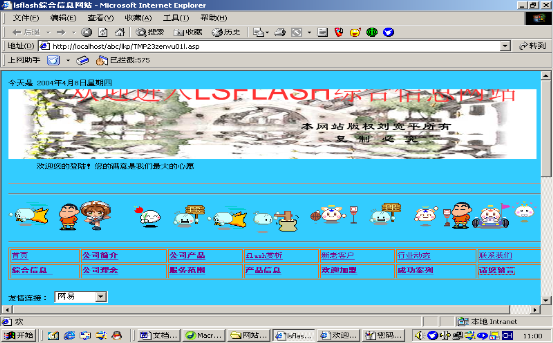
网站首页通过那些所有总连接连接到网站其他页面,在首页上,其他页面的连接很明显,使人一看就明白是连接到什么页面,这有利于提高网站的点击率,使得用客花更少的时间了解更多的信息。
(2). 综合信息布局说明:
综合信息采用分层式结构,层层连接,层层深入,使得客户既能很容易得到所需要的信息,又对网站的安全性能有很好的保障。由于该网站的修改要进行加密登陆,一般用户没有权限对网站进行修改,所以使得一般用户不能对网站进行管理,这样就很好的保证了的网络安全。
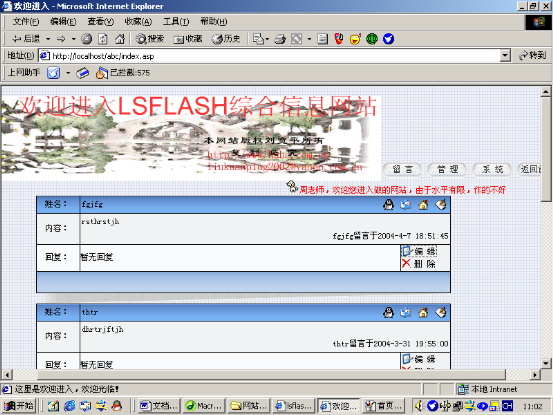
(3). 留言版图解:
留言版分为三部分:客户留言、站长回复、系统管理。这三部分使得留言半7的作用能很好的发挥。客户留言使客户进行留言,站长回复则回复客户的留言,而系统管理则有站长对整个留言版进行管理,由于要进行密码登陆,因此很好的保证了吸引的安全性。
(4). 服务范围图解:
服务范围分为:影视制作、媒介代理、平面创意、整合传播、整合传播这几部分,由于这几个连接放在很显眼的位置,所以可见性很强,客户一看就知道,这有利于业务的推广。
七、网站栏目分析与设计
网站主要分为这几部分:
1. 综合信息部分:综合信息部分包括公司人事综合信息,公司产品综合信息。
综合信息是本网站的最重要的部分,他主要向外界介绍本公司的详细信息,同时也是本公司内部管理的重要工具。因此,作好本部分是作好本网站的关键。虽然现在功能还没有完善,还没有达到理想的效果,但是还是初步模块已经成型。主要功能还是能实现。如对外把一些公司基本信息显示给客户,对内部管理则可以通过插入、删除、更改记录等进行信息的更新。这样既有利于对本公司的宣传,有有利于对本公司内部的管理,很好的体现了有本网站的优越性。
2. 公司介绍部分:站长公告,公司理念,公司简介,成功案列。
公司介绍部分是本公司对外界进行宣传,树立企业形象的一个重要工具,它的好坏直接影响到公司的形象,所以这部分把公司简介,公司理念放在重要的部分,让人一看就对公司有一个初步的了解。通过成功案列的介绍,使客户明白本公司是一个很好的公司,让他有想了解更多信息的欲望。通过站长公告即使发布公司的信息,是客户能在最短的时间内了解本公司动态。
3. 公司与外界联系部分:服务范围,新老顾客,联系我们,请您留言。
公司与外界的联系是公司与外界的一个接口,通过服务范围让客户知道我们是从事什么业务,公司通过这些而与客户发生交易;,通过留言版及时的关注顾客对本公司的看法,意见或建议,了解客户所需要的产品,以满足客户需要为目标而生产更多更好的产品,提高市场竞争力。
4. 行业动态部分:市场动态,热点新闻。友情连接,f;ash欣赏。
这部分主要是为了客户的休闲娱乐而做的,目的主要是不要使得网站不枯燥无味。因此就加大了娱乐部分。
八、 网页界面和程序代码:
1. JAVA程序代码:
(1). 向上滚动文字程序JAVA代码:
<script language="JavaScript" type="text/javascript">
<!--//
var version = "other"
browserName = navigator.appName;
browserVer = parseInt(navigator.appVersion);
if (browserName == "Netscape" && browserVer >= 3) version = "n3";
else if (browserName == "Netscape" && browserVer < 3) version = "n2";
else if (browserName == "Microsoft Internet Explorer" && browserVer >= 4) version = "e4";
else if (browserName == "Microsoft Internet Explorer" && browserVer < 4) version = "e3";
function ms()
{
if (version == "e4")
{
document.write("<marquee behavior=scroll direction=up width=100% height=200 scrollamount=1 scrolldelay=12 onmouseover='this.stop()' onmouseout='this.start()'>")
}
}
function me()
{
if (version == "e4")
{
document.write("</marquee>")
}
}
//-->
</script>
<script language="JavaScript" type="text/javascript">
ms();
</script>
(2). 显示当时年月日星期的JAVA代码:
<script language="JavaScript" type="text/javascript">
<!--
var enabled = 0; today = new Date();
var day; var date;
if(today.getDay()==0) day = "星期日"
if(today.getDay()==1) day = "星期一"
if(today.getDay()==2) day = "星期二"
if(today.getDay()==3) day = "星期三"
if(today.getDay()==4) day = "星期四"
if(today.getDay()==5) day = "星期五"
if(today.getDay()==6) day = "星期六"
document.fgColor = "000000";
date = "今天是 " + (today.getYear()) + "年" + (today.getMonth() + 1 ) + "月" + today.getDate() + "日" + day +"";
document.write(date);
// -->
</script>
(3). 关闭网页时弹出窗口代码:
<script language=vbs>
<!--
sub window_onunload()
msgbox"欢迎下次再进入我的网站","0","goodbye"
end sub
-->
</script>
(4). 防复制程序:
<SCRIPT language=javascript>
function click() {
if (event.button==2) {
alert('本站图像文字归刘宽平')
}
}
document.onmousedown=click
</SCRIPT>
(5). 显示“欢迎……”
<SCRIPT language=JavaScript>
var msg = "欢迎光临刘宽平--lsflash综合信息网站!):)" ;
var interval = 120;
var spacelen = 120;
var space10=" ";
var seq=0;
function Scroll() {
len = msg.length;
window.status = msg.substring(0, seq+1);
seq++;
if ( seq >= len ) {
seq = 0;
window.status = '';
window.setTimeout("Scroll();", interval );
}
else
window.setTimeout("Scroll();", interval );
}
Scroll();
</SCRIPT>
(6). 加载网页时弹出窗口程序:
<SCRIPT LANGUAGE='JavaScript'>window.open('shiyong.htm','_blank','toolbar=no,location=no,directories=no,status=no,menubar=no,scrollbars=0,resizable=no,top=80,left=80,width=352,height=124');</SCRIPT>
2.ASP实现部分
(1). Connections 连接数据源部分:
a. 综合信息数据源连接代码:
<%
' FileName="Connection_odbc_conn_dsn.htm"
' Type="ADO"
' DesigntimeType="ADO"
' HTTP="false"
' Catalog=""
' Schema=""
Dim MM_zhxx_STRING
MM_zhxx_STRING = "dsn=zonghexinxi;"
%>
b. 留言版数据源连接代码:
<%
' FileName="Connection_ado_conn_string.htm"
' Type="ADO"
' DesigntimeType="ADO"
' HTTP="false"
' Catalog=""
' Schema=""
Dim MM_guestbook_STRING
MM_guestbook_STRING = "Driver={Microsoft Access Driver (*.mdb)};Dbq=C:\Inetpub\wwwroot\abc\lydate.mdb;Uid=Admin;Pwd=pass;"
%>
(2). 页面数据连接实现
a. 登陆页面表单实现部分:
用户名:
<input name="textfield" type="text">
</p>
<p> 密 码:
<input name="textfield2" type="password">
</p>
<p><a href="zonghexinxi.asp"> 返回 </a>
<input type="submit" name="Submit" value="站长登陆">
b. 登陆页面数据连接部分:
<%@LANGUAGE="VBSCRIPT"%>
<!--#include file="../Connections/gengxinmima.asp" -->
<%
Dim Recordset1
Dim Recordset1_numRows
Set Recordset1 = Server.CreateObject("ADODB.Recordset")
Recordset1.ActiveConnection = MM_gengxinmima_STRING
Recordset1.Source = "SELECT * FROM 表1 ORDER BY 用户名 ASC"
Recordset1.CursorType = 0
Recordset1.CursorLocation = 2
Recordset1.LockType = 1
Recordset1.Open()
Recordset1_numRows = 0
%>
<%
' *** Validate request to log in to this site.
MM_LoginAction = Request.ServerVariables("URL")
If Request.QueryString<>"" Then MM_LoginAction = MM_LoginAction + "?" + Server.HTMLEncode(Request.QueryString)
MM_valUsername=CStr(Request.Form("textfield"))
If MM_valUsername <> "" Then
MM_fldUserAuthorization=""
MM_redirectLoginSuccess="guanli.asp"
MM_redirectLoginFailed="shibai.html"
MM_flag="ADODB.Recordset"
set MM_rsUser = Server.CreateObject(MM_flag)
MM_rsUser.ActiveConnection = MM_gengxinmima_STRING
MM_rsUser.Source = "SELECT 用户名, 密码"
If MM_fldUserAuthorization <> "" Then MM_rsUser.Source = MM_rsUser.Source & "," & MM_fldUserAuthorization
MM_rsUser.Source = MM_rsUser.Source & " FROM 表1 WHERE 用户名='" & Replace(MM_valUsername,"'","''") &"' AND 密码='" & Replace(Request.Form("textfield2"),"'","''") & "'"
MM_rsUser.CursorType = 0
MM_rsUser.CursorLocation = 2
MM_rsUser.LockType = 3
MM_rsUser.Open
If Not MM_rsUser.EOF Or Not MM_rsUser.BOF Then
' username and password match - this is a valid user
Session("MM_Username") = MM_valUsername
If (MM_fldUserAuthorization <> "") Then
Session("MM_UserAuthorization") = CStr(MM_rsUser.Fields.Item(MM_fldUserAuthorization).Value)
Else
Session("MM_UserAuthorization") = ""
End If
if CStr(Request.QueryString("accessdenied")) <> "" And false Then
MM_redirectLoginSuccess = Request.QueryString("accessdenied")
End If
MM_rsUser.Close
Response.Redirect(MM_redirectLoginSuccess)
End If
MM_rsUser.Close
Response.Redirect(MM_redirectLoginFailed)
End If
%>
c. 更新密码表单实现部分:
<table align="center">
<tr valign="baseline">
<td nowrap align="right">用户名:</td>
<td>
<input type="text" name="Element" value="<%=(Recordset1.Fields.Item("用户名").Value)%>" size="32">
</td>
</tr>
<tr valign="baseline">
<td nowrap align="right">密码:</td>
<td>
<input type="password" name="Element2" value="<%=(Recordset1.Fields.Item("密码").Value)%>" size="32">
</td>
</tr>
<tr valign="baseline">
<td nowrap align="right"> </td>
<td>
<input type="submit" value="更新记录">
</td>
</tr>
</table>
<input type="hidden" name="MM_update" value="form1">
<input type="hidden" name="MM_recordId" value="<%= Recordset1.Fields.Item("用户名").Value %>">
d. 更新密码数据连接部分:
<%@LANGUAGE="VBSCRIPT"%>
<!--#include file="../Connections/gengxinmima.asp" -->
<%
' *** Edit Operations: declare variables
Dim MM_editAction
Dim MM_abortEdit
Dim MM_editQuery
Dim MM_editCmd
Dim MM_editConnection
Dim MM_editTable
Dim MM_editRedirectUrl
Dim MM_editColumn
Dim MM_recorded
Dim MM_fieldsStr
Dim MM_columnsStr
Dim MM_fields
Dim MM_columns
Dim MM_typeArray
Dim MM_formVal
Dim MM_delim
Dim MM_altVal
Dim MM_emptyVal
Dim MM_i
MM_editAction = CStr(Request.ServerVariables("SCRIPT_NAME"))
If (Request.QueryString <> "") Then
MM_editAction = MM_editAction & "?" & Server.HTMLEncode(Request.QueryString)
End If
boolean to abort record edit
MM_abortEdit = false
query string to execute
MM_editQuery = ""
%>
<%
' *** Update Record: set variables
If (CStr(Request("MM_update")) = "form1" And CStr(Request("MM_recordId")) <> "") Then
MM_editConnection = MM_gengxinmima_STRING
MM_editTable = "表1"
MM_editColumn = "用户名"
MM_recordId = "'" + Request.Form("MM_recordId") + "'"
MM_editRedirectUrl = "denglu.asp"
MM_fieldsStr = "Element|value|Element2|value"
MM_columnsStr = "用户名|',none,''|密码|',none,''"
' create the MM_fields and MM_columns arrays
MM_fields = Split(MM_fieldsStr, "|")
MM_columns = Split(MM_columnsStr, "|")
' set the form values
For MM_i = LBound(MM_fields) To UBound(MM_fields) Step 2
MM_fields(MM_i+1) = CStr(Request.Form(MM_fields(MM_i)))
Next
append the query string to the redirect URL
If (MM_editRedirectUrl <> "" And Request.QueryString <> "") Then
If (InStr(1, MM_editRedirectUrl, "?", vbTextCompare) = 0 And Request.QueryString <> "") Then
MM_editRedirectUrl = MM_editRedirectUrl & "?" & Request.QueryString
Else
MM_editRedirectUrl = MM_editRedirectUrl & "&" & Request.QueryString
End If
End If
End If
%>
<%
' *** Update Record: construct a sql update statement and execute it
If (CStr(Request("MM_update")) <> "" And CStr(Request("MM_recordId")) <> "") Then
create the sql update statement
MM_editQuery = "update " & MM_editTable & " set "
For MM_i = LBound(MM_fields) To UBound(MM_fields) Step 2
MM_formVal = MM_fields(MM_i+1)
MM_typeArray = Split(MM_columns(MM_i+1),",")
MM_delim = MM_typeArray(0)
If (MM_delim = "none") Then MM_delim = ""
MM_altVal = MM_typeArray(1)
If (MM_altVal = "none") Then MM_altVal = ""
MM_emptyVal = MM_typeArray(2)
If (MM_emptyVal = "none") Then MM_emptyVal = ""
If (MM_formVal = "") Then
MM_formVal = MM_emptyVal
Else
If (MM_altVal <> "") Then
MM_formVal = MM_altVal
ElseIf (MM_delim = "'") Then ' escape quotes
MM_formVal = "'" & Replace(MM_formVal,"'","''") & "'"
Else
MM_formVal = MM_delim + MM_formVal + MM_delim
End If
End If
If (MM_i <> LBound(MM_fields)) Then
MM_editQuery = MM_editQuery & ","
End If
MM_editQuery = MM_editQuery & MM_columns(MM_i) & " = " & MM_formVal
Next
MM_editQuery = MM_editQuery & " where " & MM_editColumn & " = " & MM_recordId
If (Not MM_abortEdit) Then
' execute the update
Set MM_editCmd = Server.CreateObject("ADODB.Command")
MM_editCmd.ActiveConnection = MM_editConnection
MM_editCmd.CommandText = MM_editQuery
MM_editCmd.Execute
MM_editCmd.ActiveConnection.Close
If (MM_editRedirectUrl <> "") Then
Response.Redirect(MM_editRedirectUrl)
End If
End If
End If
%>
<%
Dim Recordset1
Dim Recordset1_numRows
Set Recordset1 = Server.CreateObject("ADODB.Recordset")
Recordset1.ActiveConnection = MM_gengxinmima_STRING
Recordset1.Source = "SELECT * FROM 表1 ORDER BY 用户名 ASC"
Recordset1.CursorType = 0
Recordset1.CursorLocation = 2
Recordset1.LockType = 1
Recordset1.Open()
Recordset1_numRows = 0
%>
3. 综合信息部分:
(1). 详细页显示记录部分:
a. 插入记录部分:
<%@LANGUAGE="VBSCRIPT" CODEPAGE="936"%>
<!--#include file="../Connections/zhxx.asp" -->
<%
' *** Edit Operations: declare variables
Dim MM_editAction
Dim MM_abortEdit
Dim MM_editQuery
Dim MM_editCmd
Dim MM_editConnection
Dim MM_editTable
Dim MM_editRedirectUrl
Dim MM_editColumn
Dim MM_recordId
Dim MM_fieldsStr
Dim MM_columnsStr
Dim MM_fields
Dim MM_columns
Dim MM_typeArray
Dim MM_formVal
Dim MM_delim
Dim MM_altVal
Dim MM_emptyVal
Dim MM_I
MM_editAction = CStr(Request.ServerVariables("SCRIPT_NAME"))
If (Request.QueryString <> "") Then
MM_editAction = MM_editAction & "?" & Request.QueryString
End If
boolean to abort record edit
MM_abortEdit = false
query string to execute
MM_editQuery = ""
%>
<%
' *** Insert Record: set variables
If (CStr(Request("MM_insert")) = "form1")
MM_editConnection = MM_zhxx_STRING
MM_editTable = "表1"
MM_editRedirectUrl = "zonghexinxi.asp"
MM_fieldsStr = "ID|value|Element|value|Element2|value|Element3|value|Element4|value|Element5|value|Element6|value|Element7|value|Element8|value|Element9|value"
MM_columnsStr = "ID|none,none,NULL|职位|',none,''|姓名|',none,''|性别|',none,''|年龄|',none,''|工龄|',none,''|家庭地址|',none,''|联系电话|',none,''|爱好|',none,''|专业|',none,''
create the MM_fields and MM_columns arrays
MM_fields = Split(MM_fieldsStr, "|")
MM_columns = Split(MM_columnsStr, "|")
' set the form values
For MM_i = LBound(MM_fields) To UBound(MM_fields) Step 2
MM_fields(MM_i+1) = CStr(Request.Form(MM_fields(MM_i)))
Next
append the query string to the redirect URL
If (MM_editRedirectUrl <> "" And Request.QueryString <> "") Then
If (InStr(1, MM_editRedirectUrl, "?", vbTextCompare) = 0 And Request.QueryString <> "") Then
MM_editRedirectUrl = MM_editRedirectUrl & "?" & Request.QueryString
Else
MM_editRedirectUrl = MM_editRedirectUrl & "&" & Request.QueryString
End If
End If
End If
%>
<%
' *** Insert Record: construct a sql insert statement and execute it
Dim MM_tableValues
Dim MM_dbValues
f (CStr(Request("MM_insert")) <> "") Then
create the sql insert statement
MM_tableValues = ""
MM_dbValues = ""
For MM_i = LBound(MM_fields) To UBound(MM_fields) Step 2
MM_formVal = MM_fields(MM_i+1)
MM_typeArray = Split(MM_columns(MM_i+1),",")
MM_delim = MM_typeArray(0)
If (MM_delim = "none") Then MM_delim = ""
MM_altVal = MM_typeArray(1)
If (MM_altVal = "none") Then MM_altVal = ""
MM_emptyVal = MM_typeArray(2)
If (MM_emptyVal = "none") Then MM_emptyVal = ""
If (MM_formVal = "") Then
MM_formVal = MM_emptyVal
Else
If (MM_altVal <> "") Then
MM_formVal = MM_altVal
ElseIf (MM_delim = "'") Then ' escape quotes
MM_formVal = "'" & Replace(MM_formVal,"'","''") & "'"
Else
MM_formVal = MM_delim + MM_formVal + MM_delim
End If
End If
If (MM_i <> LBound(MM_fields)) Then
MM_tableValues = MM_tableValues & ","
MM_dbValues = MM_dbValues & ","
End If
MM_tableValues = MM_tableValues & MM_columns(MM_i)
MM_dbValues = MM_dbValues & MM_formVal
Next
MM_editQuery = "insert into " & MM_editTable & " (" & MM_tableValues & ") values (" & MM_dbValues & ")"
If (Not MM_abortEdit) Then
' execute the insert
Set MM_editCmd = Server.CreateObject("ADODB.Command")
MM_editCmd.ActiveConnection = MM_editConnection
MM_editCmd.CommandText = MM_editQuery
MM_editCmd.Execute
MM_editCmd.ActiveConnection.Close
If (MM_editRedirectUrl <> "") Then
Response.Redirect(MM_editRedirectUrl)
End If
End IfEnd If
%>
<%
Dim Recordset1
Dim Recordset1_numRows
Set Recordset1 = Server.CreateObject("ADODB.Recordset")
Recordset1.ActiveConnection = MM_zhxx_STRING
Recordset1.Source = "SELECT * FROM 表1 ORDER BY ID ASC"
Recordset1.CursorType = 0
Recordset1.CursorLocation = 2
Recordset1.LockType = 1
Recordset1.Open()
Recordset1_numRows = 0
%>
(2). 删除记录部分
a. 表单实现部分:
<form name="form1" method="POST" action="<%=MM_editAction%>">
<p>I D :
<input name="textfield2" type="text" value="<%=(Recordset1.Fields.Item("ID").Value)%>">
</p>
<p>职 位 :
<input name="textfield" type="text" value="<%=(Recordset1.Fields.Item("职位").Value)%>">
</p>
<p>姓 名:
<input name="textfield3" type="text" value="<%=(Recordset1.Fields.Item("姓名").Value)%>">
</p>
<p>性 别:
<input name="textfield4" type="text" value="<%=(Recordset1.Fields.Item("性别").Value)%>">
</p>
<p>年 龄
:
<input name="textfield5" type="text" value="<%=(Recordset1.Fields.Item("年龄").Value)%>">
</p>
<p>工 龄
:<input name="textfield6" type="text" value="<%=(Recordset1.Fields.Item("工龄").Value)%>">
</p>
<p>家 庭 地 址
:
<input name="textfield8" type="text" value="<%=(Recordset1.Fields.Item("家庭地址").Value)%>">
</p>
<p>联 系 电 话
:
<input name="textfield9" type="text" value="<%=(Recordset1.Fields.Item("联系电话").Value)%>">
</p>
<p> 爱 好
:
<input name="textfield10" type="text" value="<%=(Recordset1.Fields.Item("爱好").Value)%>">
</p>
<p>专 业 :
<input name="textfield11" type="text" value="<%=(Recordset1.Fields.Item("专业").Value)%>">
总共有
<input name="textfield7" type="text" value="<%=(Recordset1_total)%>" size="5">
条记录 </p>
<p>
<input type="submit" name="Submit" value="删除记录 ">
</p>
<table border="0" width="50%" align="center">
<tr>
<td width="23%" align="center">
<% If MM_offset <> 0 Then %>
<a href="<%=MM_moveFirst%>"><img src="First.gif" border=0></a>
<% End If ' end MM_offset <> 0 %>
</td>
<td width="31%" align="center">
<% If MM_offset <> 0 Then %>
<a href="<%=MM_movePrev%>"><img src="Previous.gif" border=0></a>
<% End If ' end MM_offset <> 0 %>
</td>
<td width="23%" align="center">
<% If Not MM_atTotal Then %>
<a href="<%=MM_moveNext%>"><img src="Next.gif" border=0></a>
<% End If ' end Not MM_atTotal %>
</td>
<td width="23%" align="center">
<% If Not MM_atTotal Then %>
<a href="<%=MM_moveLast%>"><img src="Last.gif" border=0></a>
<% End If ' end Not MM_atTotal %>
</td>
</tr>
</table>
<p><input type="hidden" name="MM_delete" value="form1">
<input type="hidden" name="MM_recordId" value="<%= Recordset1.Fields.Item("ID").Value %>">
</p>
</form>
(2). 数据连接部分:
<%@LANGUAGE="VBSCRIPT"%>
<!--#include file="../Connections/zhxx.asp" -->
<%
' *** Edit Operations: declare variables
Dim MM_editAction
Dim MM_abortEdit
Dim MM_editQuery
Dim MM_editCmd
Dim MM_editConnection
Dim MM_editTable
Dim MM_editRedirectUrl
Dim MM_editColumn
Dim MM_recorded
Dim MM_fieldsStr
Dim MM_columnsStr
Dim MM_fields
Dim MM_columns
Dim MM_typeArray
Dim MM_formVal
Dim MM_delim
Dim MM_altVal
Dim MM_emptyVal
Dim MM_i
MM_editAction = CStr(Request.ServerVariables("SCRIPT_NAME"))
If (Request.QueryString <> "") Then
MM_editAction = MM_editAction & "?" & Server.HTMLEncode(Request.QueryString)
End If
' boolean to abort record edit
MM_abortEdit = false
' query string to execute
MM_editQuery = ""
%>
<%
' *** Delete Record: declare variables
if (CStr(Request("MM_delete")) = "form1" And CStr(Request("MM_recordId")) <> "") Then
MM_editConnection = MM_zhxx_STRING
MM_editTable = "表1"
MM_editColumn = "ID"
MM_recordId = "" + Request.Form("MM_recordId") + ""
MM_editRedirectUrl = "shanchujilu.asp"
append the query string to the redirect URL
If (MM_editRedirectUrl <> "" And Request.QueryString <> "") Then
If (InStr(1, MM_editRedirectUrl, "?", vbTextCompare) = 0 And Request.QueryString <> "") Then
MM_editRedirectUrl = MM_editRedirectUrl & "?" & Request.QueryString
Else
MM_editRedirectUrl = MM_editRedirectUrl & "&" & Request.QueryString
End If
End If
End If
%>
<%
' *** Delete Record: construct a sql delete statement and execute it
If (CStr(Request("MM_delete")) <> "" And CStr(Request("MM_recordId")) <> "") Then
' create the sql delete statement
MM_editQuery = "delete from " & MM_editTable & " where " & MM_editColumn & " = " & MM_recordId
If (Not MM_abortEdit) Then
' execute the delete
Set MM_editCmd = Server.CreateObject("ADODB.Command")
MM_editCmd.ActiveConnection = MM_editConnection
MM_editCmd.CommandText = MM_editQuery
MM_editCmd.Execute
MM_editCmd.ActiveConnection.Close
If (MM_editRedirectUrl <> "") Then
Response.Redirect(MM_editRedirectUrl)
End If
End If
End If
%>
<%
Dim Recordset1
Dim Recordset1_numRows
Set Recordset1 = Server.CreateObject("ADODB.Recordset")
Recordset1.ActiveConnection = MM_zhxx_STRING
Recordset1.Source = "SELECT * FROM 表1 ORDER BY ID ASC"
Recordset1.CursorType = 0
Recordset1.CursorLocation = 2
Recordset1.LockType = 1
Recordset1.Open()
Recordset1_numRows = 0
%>
<%
' *** Recordset Stats, Move To Record, and Go To Record: declare stats variables
Dim Recordset1_total
Dim Recordset1_first
Dim Recordset1_last
' set the record count
Recordset1_total = Recordset1.RecordCount
' set the number of rows displayed on this page
If (Recordset1_numRows < 0) Then
Recordset1_numRows = Recordset1_total
Elseif (Recordset1_numRows = 0) Then
Recordset1_numRows = 1
End If
' set the first and last displayed record
Recordset1_first = 1
Recordset1_last = Recordset1_first + Recordset1_numRows - 1
' if we have the correct record count, check the other stats
If (Recordset1_total <> -1) Then
If (Recordset1_first > Recordset1_total) Then
Recordset1_first = Recordset1_total
End If
If (Recordset1_last > Recordset1_total) Then
Recordset1_last = Recordset1_total
End If
If (Recordset1_numRows > Recordset1_total) Then
Recordset1_numRows = Recordset1_total
End If
End If
%>
<%
Dim MM_paramName
%>
<%
' *** Move To Record and Go To Record: declare variables
Dim MM_rs
Dim MM_rsCount
Dim MM_size
Dim MM_uniqueCol
Dim MM_offset
Dim MM_atTotal
Dim MM_paramIsDefined
Dim MM_param
Dim MM_index
Set MM_rs = Recordset1
MM_rsCount = Recordset1_total
MM_size = Recordset1_numRows
MM_uniqueCol = ""
MM_paramName = ""
MM_offset = 0
MM_atTotal = false
MM_paramIsDefined = false
If (MM_paramName <> "") Then
MM_paramIsDefined = (Request.QueryString(MM_paramName) <> "")
End If
%>
<%
' *** Move To Record: handle 'index' or 'offset' parameter
if (Not MM_paramIsDefined And MM_rsCount <> 0) then
' use index parameter if defined, otherwise use offset parameter
MM_param = Request.QueryString("index")
If (MM_param = "") Then
MM_param = Request.QueryString("offset")
End If
If (MM_param <> "") Then
MM_offset = Int(MM_param)
End If
if we have a record count, check if we are past the end of the recordset
If (MM_rsCount <> -1) Then
If (MM_offset >= MM_rsCount Or MM_offset = -1) Then ' past end or move last
If ((MM_rsCount Mod MM_size) > 0) Then ' last page not a full repeat region
MM_offset = MM_rsCount - (MM_rsCount Mod MM_size)
Else
MM_offset = MM_rsCount - MM_size
End If
End If
End If
move the cursor to the selected record
MM_index = 0
While ((Not MM_rs.EOF) And (MM_index < MM_offset Or MM_offset = -1))
MM_rs.MoveNext
MM_index = MM_index + 1
Wend
If (MM_rs.EOF) Then
MM_offset = MM_index ' set MM_offset to the last possible record
End If
End If
%>
<%
' *** Move To Record: if we dont know the record count, check the display range
If (MM_rsCount = -1) T walk to the end of the display range for this page
MM_index = MM_offset
While (Not MM_rs.EOF And (MM_size < 0 Or MM_index < MM_offset + MM_size))
MM_rs.MoveNext
MM_index = MM_index + 1
Wend
if we walked off the end of the recordset, set MM_rsCount and MM_size
If (MM_rs.EOF) Then
MM_rsCount = MM_index
If (MM_size < 0 Or MM_size > MM_rsCount) Then
MM_size = MM_rsCount
End If
End If
if we walked off the end, set the offset based on page size
If (MM_rs.EOF And Not MM_paramIsDefined) Then
If (MM_offset > MM_rsCount - MM_size Or MM_offset = -1) Then
If ((MM_rsCount Mod MM_size) > 0) Then
MM_offset = MM_rsCount - (MM_rsCount Mod MM_size)
Else
MM_offset = MM_rsCount - MM_size
End If
End If
End If
reset the cursor to the beginning
If (MM_rs.CursorType > 0) Then
MM_rs.MoveFirst
Else
MM_rs.Requery
End If
move the cursor to the selected record
MM_index = 0
While (Not MM_rs.EOF And MM_index < MM_offset)
MM_rs.MoveNext
MM_index = MM_index + 1
Wend
End If
%>
<%
' *** Move To Record: update recordset stats
set the first and last displayed record
Recordset1_first = MM_offset + 1
Recordset1_last = MM_offset + MM_size
If (MM_rsCount <> -1) Then
If (Recordset1_first > MM_rsCount) Then
Recordset1_first = MM_rsCount
End If
If (Recordset1_last > MM_rsCount) Then
Recordset1_last = MM_rsCount
End If
End If
set the boolean used by hide region to check if we are on the last record
MM_atTotal = (MM_rsCount <> -1 And MM_offset + MM_size >= MM_rsCount)
%>
<%
' *** Go To Record and Move To Record: create strings for maintaining URL and Form parameters
Dim MM_keepNone
Dim MM_keepURL
Dim MM_keepForm
Dim MM_keepBoth
Dim MM_removeList
Dim MM_item
Dim MM_nextItem
create the list of parameters which should not be maintained
MM_removeList = "&index="
If (MM_paramName <> "") Then
MM_removeList = MM_removeList & "&" & MM_paramName & "="
End If
MM_keepURL=""
MM_keepForm=""
MM_keepBoth=""
MM_keepNone=""
' add the URL parameters to the MM_keepURL string
For Each MM_item In Request.QueryString
MM_nextItem = "&" & MM_item & "="
If (InStr(1,MM_removeList,MM_nextItem,1) = 0) Then
MM_keepURL = MM_keepURL & MM_nextItem & Server.URLencode(Request.QueryString(MM_item))
End If
Next
add the Form variables to the MM_keepForm string
For Each MM_item In Request.Form
MM_nextItem = "&" & MM_item & "="
If (InStr(1,MM_removeList,MM_nextItem,1) = 0) Then
MM_keepForm = MM_keepForm & MM_nextItem & Server.URLencode(Request.Form(MM_item))
End If
Next
' create the Form + URL string and remove the intial '&' from each of the strings
MM_keepBoth = MM_keepURL & MM_keepForm
If (MM_keepBoth <> "") Then
MM_keepBoth = Right(MM_keepBoth, Len(MM_keepBoth) - 1)
End If
If (MM_keepURL <> "") Then
MM_keepURL = Right(MM_keepURL, Len(MM_keepURL) - 1)
End If
If (MM_keepForm <> "") Then
MM_keepForm = Right(MM_keepForm, Len(MM_keepForm) - 1)
End If
' a utility function used for adding additional parameters to these strings
Function MM_joinChar(firstItem)
If (firstItem <> "") Then
MM_joinChar = "&"
Else
MM_joinChar = ""
End If
End Function
%>
<%
' *** Move To Record: set the strings for the first, last, next, and previous links
Dim MM_keepMove
Dim MM_moveParam
Dim MM_moveFirst
Dim MM_moveLast
Dim MM_moveNext
Dim MM_movePrev
Dim MM_urlStr
Dim MM_paramList
Dim MM_paramIndex
Dim MM_nextParam
MM_keepMove = MM_keepBoth
MM_moveParam = "index"
if the page has a repeated region, remove 'offset' from the maintained parameters
If (MM_size > 1) Then
MM_moveParam = "offset"
If (MM_keepMove <> "") Then
MM_paramList = Split(MM_keepMove, "&")
MM_keepMove = ""
For MM_paramIndex = 0 To UBound(MM_paramList)
MM_nextParam = Left(MM_paramList(MM_paramIndex), InStr(MM_paramList(MM_paramIndex),"=") - 1)
If (StrComp(MM_nextParam,MM_moveParam,1) <> 0) Then
MM_keepMove = MM_keepMove & "&" & MM_paramList(MM_paramIndex)
End If
Next
If (MM_keepMove <> "") Then
MM_keepMove = Right(MM_keepMove, Len(MM_keepMove) - 1)
End If
End If
End If
set the strings for the move to links
If (MM_keepMove <> "") Then
MM_keepMove = Server.HTMLEncode(MM_keepMove) & "&"
End If
MM_urlStr = Request.ServerVariables("URL") & "?" & MM_keepMove & MM_moveParam & "="
MM_moveFirst = MM_urlStr & "0"
MM_moveLast = MM_urlStr & "-1"
MM_moveNext = MM_urlStr & CStr(MM_offset + MM_size)
If (MM_offset - MM_size < 0) Then
MM_movePrev = MM_urlStr & "0"
Else
MM_movePrev = MM_urlStr & CStr(MM_offset - MM_size)
End If
%>
<%
' *** Recordset Stats: if we don't know the record count, manually count them
f (Recordset1_total = -1) Then
count the total records by iterating through the recordset
Recordset1_total=0
While (Not Recordset1.EOF)
Recordset1_total = Recordset1_total + 1
Recordset1.MoveNext
Wend
reset the cursor to the beginning
If (Recordset1.CursorType > 0) Then
Recordset1.MoveFirst
Else
Recordset1.Requery
End If
' set the number of rows displayed on this page
If (Recordset1_numRows < 0 Or Recordset1_numRows > Recordset1_total) Then
Recordset1_numRows = Recordset1_total
End If
' set the first and last displayed record
Recordset1_first = 1
Recordset1_last = Recordset1_first + Recordset1_numRows - 1
f (Recordset1_first > Recordset1_total) Then
Recordset1_first = Recordset1_total
End If
If (Recordset1_last > Recordset1_total) Then
Recordset1_last = Recordset1_total
End IfEnd If
%>
(2). 更新记录部分:(更新记录部分与更新密码相似,所以就略去)
由于留言版ASP代码、产品信息ASP代码与综合信息代码相似,所以就省略没没有写出。
九、网站界面:
1. 首页界面:
2. 综合信息显示表页面:

3. 更新记录页面:
4.删除记录
5. 站长登陆页面:

6.留言版页面:
7. 客户留言页面:

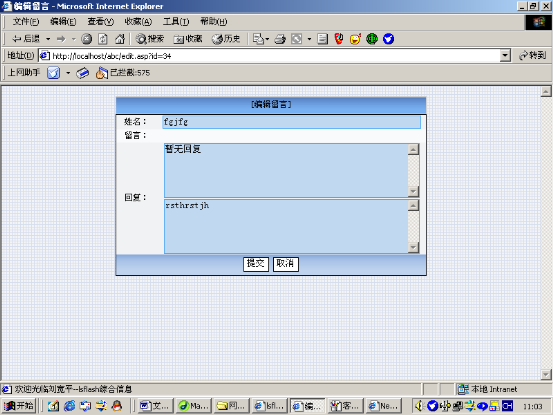
8.回复留言页面:
十、参考文献:
《java2实用教程》 龚详一 清化大学出版社
《dreamweaver MX入门与提高》 周家地 清化大学出版社
《jsp实用教程》 张跃平 南开大学出版社
〈网站制作教程〉 廖还华 电子工业出版社